

A walkthrough of the design and development process of the Machine Writing build’s front end.
INTRO
With the new penholder and the existing letters/GCode output system, the machine was writing reliably. It had all of the functionality (and more) that I had intended to give it from the outset.
It was still far from finished. The entire toolpath generation process was run out of the Java console: when the code would run, it would prompt you to give it the name of a text file (.txt), a settings file (.wst [Writer SeTtings file]), and a name for the GCode toolpath (.tap) output file. The directories these files were grabbed from/saved to were hardcoded into the system, and while this worked well enough for me, I didn’t want to be the only person able to run it.
I’d never built a piece of software for anybody else. I know a lot about user interfaces—what features make them user-friendly and what features make you want to take a swing at your monitor—but all I’d learned was from the side of the consumer. It was time for this to change. And so I set out to turn my cryptic app into something anybody could use.
PLANNING
I considered switching languages at this point. My experiences in the past with Java’s Swing library had been less than pleasant, and I was about to build a far more involved and complicated GUI than I ever had before. I’d heard that C++ was widely-used for fast and clean GUIs, but I didn’t want to have to add memory management to my plate of things to worry about. People seem to rave about Python’s GUI options, and there’s definitely no shortage of different graphics packages. There are tons of options out there to build a front end.
What it all came down to was time. I knew I was operating in a very limited time frame, and that if I wanted to keep the pace that I had set in the earlier stages of the project I couldn’t afford to restart the coding process in another language. Swing it was.
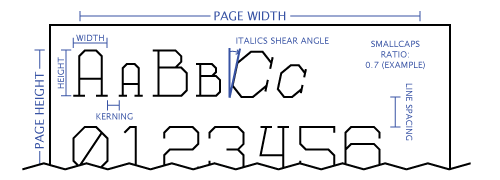
First things first, I had to establish what had to be outlined to the user. Short answer: everything. It isn’t obvious what any of the settings mean without any extra information, so it was clear that a visual representation of each parameter was in order.
Secondly, the program had to be accessible. The interface had to accomplish three main tasks—settings input, text input, and file export. I already had methods in place to handle all of these tasks through importing files off of the user’s computer, so it would be easy enough to build them into the GUI. However, it’s neither convenient nor practical to have users manually edit a very specifically formatted settings file. For the user interface, I would keep the import settings and text functionality, but they would be secondary methods behind inputting the settings and text right in the GUI pane.
PROCESS
Coming from a background of graphic and print design, Swing seems as if it was intentionally created to build unappealing interfaces. At every step along the way, it seemed as if it could do everything but what I wanted it to do. Using a visual GUI builder tool (I used Eclipse’s WindowBuilder) made things a whole lot easier, but still far from painless.
With WindowBuilder, making the GUI was a lot like formatting an Excel spreadsheet, but with a whole lot more program crashes and internal errors. You have to wrestle with it a little to make it do what you want to do, and in the end it only vaguely resembles what you had in mind at the outset. I wish it was easier to change the overall look of the GUI, but none of the default “LookAndFeel” themes available are any good, and I didn’t mind the look enough to define my own JButton class with a different paint method.
For the visual definition of each settings parameter, I took to trusty Illustrator and quickly whipped this graphic up.
All in all the front end took about as long as developing the meat of the code did. I think I’ve gotten over my irrational hatred/fear of Swing, and would not be against using it for something similar in the future,
END PRODUCT
Here we are. Below is an image of the full-screen app. It launches as a smaller size, but I usually like to fullscreen it if I’m going to be writing more than a few words.
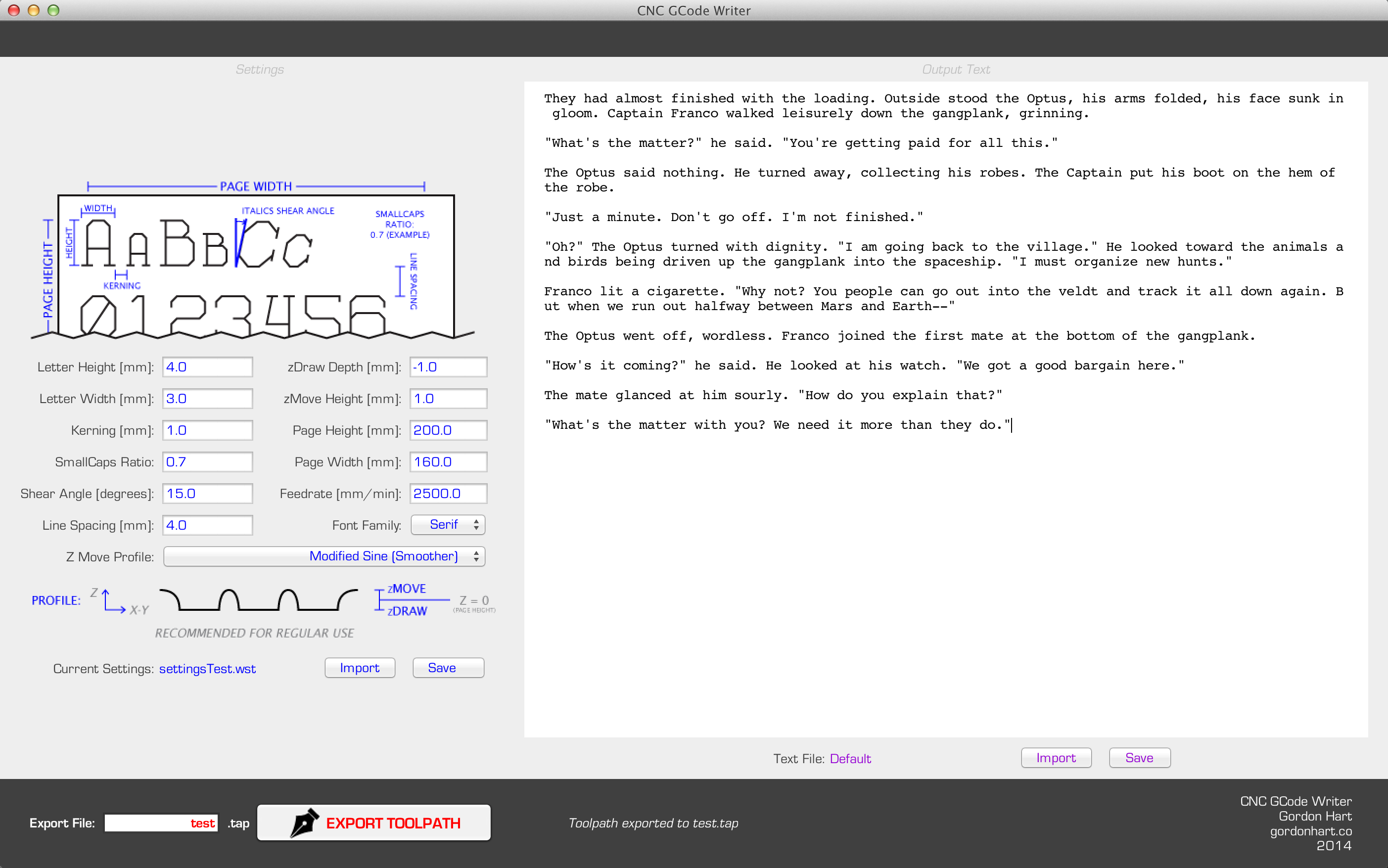
It has a text field for every different input setting, a dropdown menu for the font and the Z Path Profile (more on this in a coming post), and buttons to import and save settings/text files and export the toolpath. The text editor box scrolls as necessary and only accepts ASCII plain text, which suits this application well.
Each of the import/save/export buttons pops up a JFileChooser dialog box from which you can pick your import file or save location. Once you’ve exported a job, a small dialog box appears and gives you the job summary, which includes the status (completed or aborted), number of lines of text, number of lines of print, and number of pages of print.
It’s not the prettiest front end out there, but I wouldn’t call it ugly, either. I can’t really speak for its user experience—I know exactly what’s going on with it at all times, so it doesn’t mean much when I say that it’s quick and intuitive.
TAKEAWAY
Creating the GUI has already proven to be a worthwhile endeavor. It’s currently sitting on my desktop as a runnable .jar, and the process of generating a writing toolpath is now as easy as clicking on the icon.
Not having to go into the IDE to run the app puts a strange layer of removal between the program and me. Just clicking on the “Writer” icon and running the program feels a bit like I’m using somebody else’s software. Then, in my mind it’s lumped it together with all of the other various pieces of software I’ve used before. Putting my creation up against all of the programs in my mental software hierarchy makes me realize just how much work goes into a commercial program.
The one main thing that I would have to say coming away from this project is that primarily, I’m not a software guy. Don’t get me wrong—it’s impossible to deny the huge role that software development plays in the engineering process—I’ve just found that it’s not where my passions lie.
I like to operate in the wiggle room between the real and the virtual world, with a definite bias towards the real side. Making the bones of the program was a ton of fun; getting the system working and controlling the machine as intended gave me a sense of satisfaction that was not matched by creating the GUI.
Making the “padding” around the base code to make it user-friendly just didn’t seem like I was getting any real work done. The project has distinct roots in the real world—after all, it is all designed to make a machine move. As such, it was hard for me to view the GUI, a piece that doesn’t effect the end product (the writing), as anything more than peripheral to the actual goal.
That being said, it’s still an extremely useful tool. I’m swamped with other obligations for now, but looking forward I’d really like to host it in runnable form somewhere on this website. One of the main reasons I made a GUI for it was to allow other people to use and understand what I had built.
The idea of other people using my program is exciting. I know I have a lot of use for it, and I feel that there are enough CNC machines out there that somebody else is bound to as well.
Soon enough, the Writer may be coming to a domain near you. Thanks for reading and stay tuned for more MachineWriting posts!
GH

